企業や事業の成長段階において、資金や設備、人材などの壁は必ず発生します。ECビジネスも例外ではありません。それをどうクリアするか? その1つのアプローチとして、M&Aで他社に売却する「成長型EXIT」が増えているのをご存じですか? M&AによるEXITは事業継承のイメージが強いですが、ここであげるのは事業をより大きく成長するために大手へ売却し、最速での成長をめざす手法です。ECビジネスに関するM&Aが増えている背景とM&Aの手法、基礎情報を解説します。
M&A浸透の背景と現状、そして現実
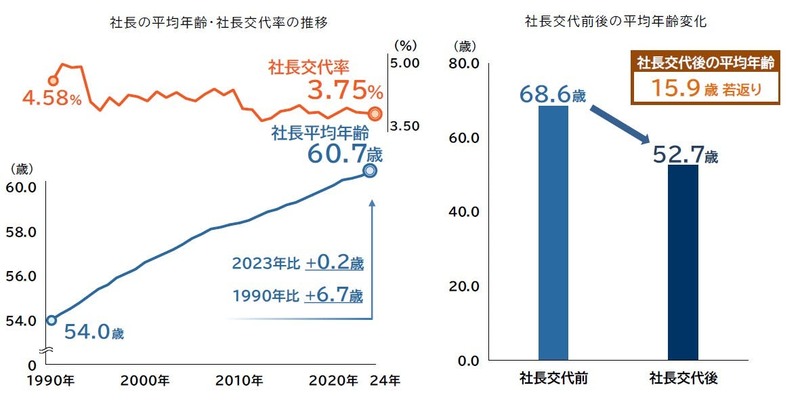
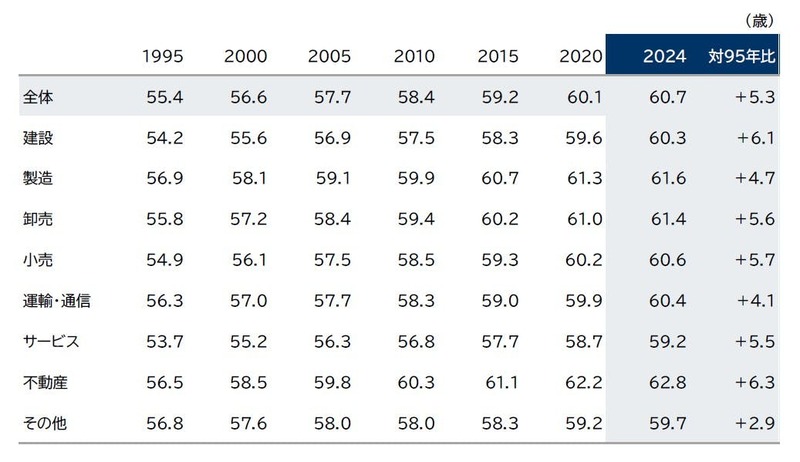
日本の中小企業は経営者の高齢化が進んでいます。帝国データバンクの調べによると、2024年の平均年齢は60.7歳と過去最高を更新。そして、50歳以上になるとなんと80%を超えています。
もうこの手の話を聞いても誰も驚きませんよね。業種によって大きな差はありませんが、唯一サービス業が60歳を下回っています。これはITや飲食などの業界も含まれるからだと推測されます。
全国の全業種約27万社を対象とした2024年の後継者動向を調べると、後継者が「いない」「未定」とした企業は14.2万社で、後継者不在率は52.1%に達しました。国はこの状況に危機感を抱きました。「これを何とかしなければ、大失業時代に突入してしまう」――。こうしてここ数年、国からは事業承継・M&A補助金の制度が作られ、地方の中小零細企業にまでM&Aが浸透してきました。
確かに、後継者不在の企業を継続させる手段としては、M&Aは効果的です。しかし、一方で残酷な現実もあります。それは「儲かっている会社には後継者が見つかる」というもので、裏を返せば「儲かっていない会社では見つからない」ということです。
身体的にきつい、あるいは危険を伴うなどの理由で、一般的に不人気とされる業種でも、利益が計上されている会社であれば、後継者に困るケースは少ないでしょう。状況をよく知っている取引先などが、買収に名乗りを上げるケースが多いからです。
ただ、後継者不在の会社は、だいたい儲かってない。これが現実です。儲かってないから、後を継ごうという人が少ないのです。
会社を継続させたいのであれば、利益を出して企業価値を高めるしか道はありません。身も蓋もない言い方ですが、それが現実です。
特殊な技術や知的財産を持っているなどのケースは別ですが、それらがない状態で「救済型M&A」を進めても、未知数の「シナジー効果」に期待するしかない買い手企業にとっては、多くの場合リスクしかありません。
「売って終わり」ではない成長型のEXITとは
一方で、後継者不在による事業承継とは異なり、別の目的でM&Aをするケースも実は増えています。
それが、本稿のテーマである「成長型EXIT」とも言える、より大きな成長をめざしたM&Aです。
通常、EXITと言えば、売り手企業の経営者は、一定期間の引き継ぎを終えたら会社を去るというイメージがあるでしょう。なかには事業から引退する人、売却益を元手に別の事業に進出する人もいるでしょう。
ここで示す「成長型EXIT」は、手がけてきた事業をより成長させるために体力のある企業に売却、経営者自身も売却後も経営に携わりながら成長をめざすというイメージです。
この手法は従来からあったものですが、最近は特に若い起業家を中心に増えてきています。理由の1つはIPO(新規株式公開)の魅力が薄れてきたことがあげられるでしょう。
IPOはハードルが高い割にはメリットが少ない。やたらと「公の企業」として制限が多い。四半期ごとに業績を公表しなければならない――。そんなイメージがあるIPOに変わる選択肢として、M&Aがクローズアップされてきたのが要因だと考えられます。
個人事業もEXITの選択肢にM&A
私は、どんな事業でも出口を決めておくことを重要視しています。たとえば、新規事業を始める時も、重要なのは「撤退ライン」を設定することで、致命的なダメージを防ぐことができます。
会社としてどこをめざすのか、そのためにはどんな手段でいつやるのか。出口のHowとWhenを明確にすると、それまでの選択で迷いが少なくなります。
事業の成長段階では、人材や設備などへの投資、在庫需要の増大などで、必ず資金ニーズが発生します。その際、IPOをめざすのならVC(ベンチャーキャピタル)から資金調達をするのも有力な手段でしょう。
しかし、M&AをEXITとするのであれば、他人資本を入れるとそれが大きなネックになる可能性が出てきます。また、多くの場合、VCは小型のM&Aについてはあまり関心を示しません。なぜなら、VCのビジネスモデルとしては、リターンが少なすぎるからです。
資金調達一つとっても、EXITを設定していれば選択肢がおのずと絞られてくるのです。これは人材採用なども同じです。特に日本の場合、人材は一度採用すると簡単に会社都合でカットできませんので、出口を見据えて戦略的な採用が必要です。
さらに最近の傾向で特徴的なのが、M&Aの小型化です。たとえば、私が手がけた案件でいうと、年間の売上高が2,000万円くらいの個人事業もありました。どんな小規模事業者でも、M&Aが普通の選択肢になってきていることがわかります。
小規模ビジネスでも知っておきたい、M&Aの基礎知識
ここで、M&Aに関する基礎的な知識を共有しておきます。M&Aの種類は、大きく分けて2種類です。1つは「株式譲渡」。もう1つは「事業譲渡」です。
株式譲渡
株式売却のことです。売却する株の割合によってオーナーシップが変わることになります。たとえば、100%譲渡を契約した場合、株を保有するすべての株主が売却に同意しなければ、譲渡は実行されません。
また、会社の資産だけでなく負債も買い手企業に譲渡されることになります。M&Aでは、借入の経営者保証が問題になったりしますが、これも株式譲渡の場合ですね。
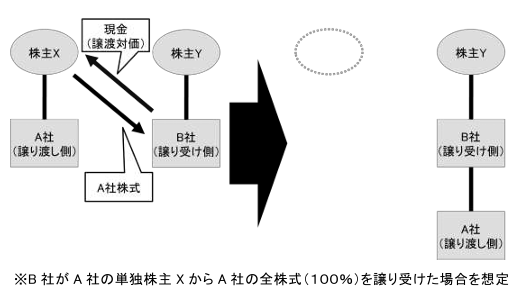 この図のケースの場合、譲り渡し側の株主(図ではX株主)保有している発行済株式を、譲り受け側(B社)に譲渡する手法で、譲り渡し側(A社)を譲り受け側の子会社とするイメージ(画像は中小企業庁の「中小M&Aガイドライン」からキャプチャ)
事業譲渡
会社そのものを売買するのではなく、事業を会社から切り離して売却するというものです。複数の事業をしている会社が、そのうちの1つの事業を売却するようなパターンですね。
これは、オーナー(株主)が変わるという単純なものではなく、事業主体が変わるわけですので、少々複雑な手続きが必要です。たとえば、取引先や事務所オーナーとの契約のまき直し、資格、許認可などが新たに必要となるわけです。
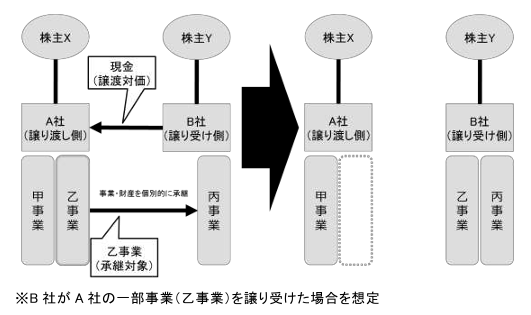 この図のケースの場合、譲り渡し側(A社)が有する事業の全部または一部(土地、建物、機械設備などの資産や負債に加え、ノウハウや知的財産権なども含む)を、譲り受け側(B社)に譲渡するイメージ(画像は中小企業庁の「中小M&Aガイドライン」からキャプチャ)
いずれの形態にしても、M&Aの実行を決めた後は、まずバリュエーション(企業/事業の価値評価)から始めます。その後のフローは次回以降で掘り下げますが、このバリュエーションに対する考え方はとても重要ですので、最初に少し触れておきます。
バリュエーション、誰が「価値」を決めるのか
ファイナンス理論的に、バリュエーション手法はいくつもあります。大きく分けて、マーケットアプローチ、インカムアプローチ、コストアプローチと分類され、その中でもDCF(ディスカウントキャッシュフロー)法やマルチプル法、時価純資産法など、具体的な計算方法も多岐にわたります。
これらは、それぞれ考え方が全く異なります。規模や業種によって、向き不向きはありますが、「これが正解」という計算方法は存在しません。そして、非上場企業の場合、計算方法以前に企業価値そのものに正解はないのです。
会社や事業を売りたい人は、はじめに自社の価値を把握するためにバリュエーションをして、希望価格を設定し、興味を持った買い手企業との交渉を始めます。
買い手は、交渉を通じて、またDD(デューデリジェンス=企業調査)を通じて、さらに詳細に価値の判断をします。その結果、買い手が価格を提示して、それに売り手が納得すれば商談成立です。
つまり、価格を決めるのは両者の合意です。そう書くと極めて当たり前のことですが、M&Aはあくまでも商取引です。どれだけ難しい理論で、緻密に企業価値を計算しても、双方がその金額に納得しなければ取引は成立しません。非上場企業において、「客観的に正しい金額」など存在しないのです。
自社の企業/事業価値を把握するのは、非常に重要なことですが、売り手は特にそのことを理解して、この金額以下なら売らないという撤退ラインを決めておくといいでしょう。いわば、M&Aの出口戦略です。
◇◇◇
次回以降、EC事業の具体的な評価方法とM&Aのプロセスを解説します。
※このコンテンツはWebサイト「ネットショップ担当者フォーラム - 通販・ECの業界最新ニュースと実務に役立つ実践的な解説」で公開されている記事のフィードに含まれているものです。
オリジナル記事:あなたの事業を「売ってください!」が当たり前の時代に。「成長型EXIT」の今とリアル+M&Aの基礎知識 | ECビジネスを成長させるM&A「成長型EXIT」のリアル
Copyright (C) IMPRESS CORPORATION, an Impress Group company. All rights reserved.